The Aadhaar Card is a 12-digit unique identification number issued by the Unique Identification Authority of India (UIDAI). It serves as a vital proof of identity and address for Indian residents. This guide explains how to Aadhaar Card Download (e-Aadhaar) online using various methods. You can download your e-Aadhaar instantly using your Aadhaar Number, Enrolment ID (EID), or Virtual ID (VID) through the official UIDAI portal.
What is e-Aadhaar?
e-Aadhaar is a digitally signed electronic version of your Aadhaar card, issued by UIDAI. It contains:
- Aadhaar number (12 digits)
- Name, address, date of birth, and gender
- Photograph and QR code
- Digitally verified signature by UIDAI
As per the Aadhaar Act, 2016, e-Aadhaar is legally valid across India as proof of identity and address.
You can download either:
- Regular Aadhaar (shows full Aadhaar number), or
- Masked Aadhaar (shows only the last four digits for privacy).
File Format: PDF (password-protected)
Password Format: First four letters of your name in uppercase + year of birth (YYYY).
Example: For Priya born in 1990 → PRIY1990
Prerequisites to Download Aadhaar
Before the Aadhaar Card download online, ensure you have:
- Aadhaar Number (UID), Enrolment ID (EID), or Virtual ID (VID)
- Registered mobile number (to receive OTP)
- Stable internet connection
- PDF reader (Adobe Acrobat, Microsoft Edge, etc.)
If your mobile number isn’t linked, visit the nearest Aadhaar Seva Kendra (ASK).
Methods to Aadhaar Card Download Online
1. My Aadhaar Card Download via UIDAI’s myAadhaar Portal
- Visit the UIDAI Aadhaar portal.
- Click on “Download Aadhaar” under the “My Aadhaar” section.
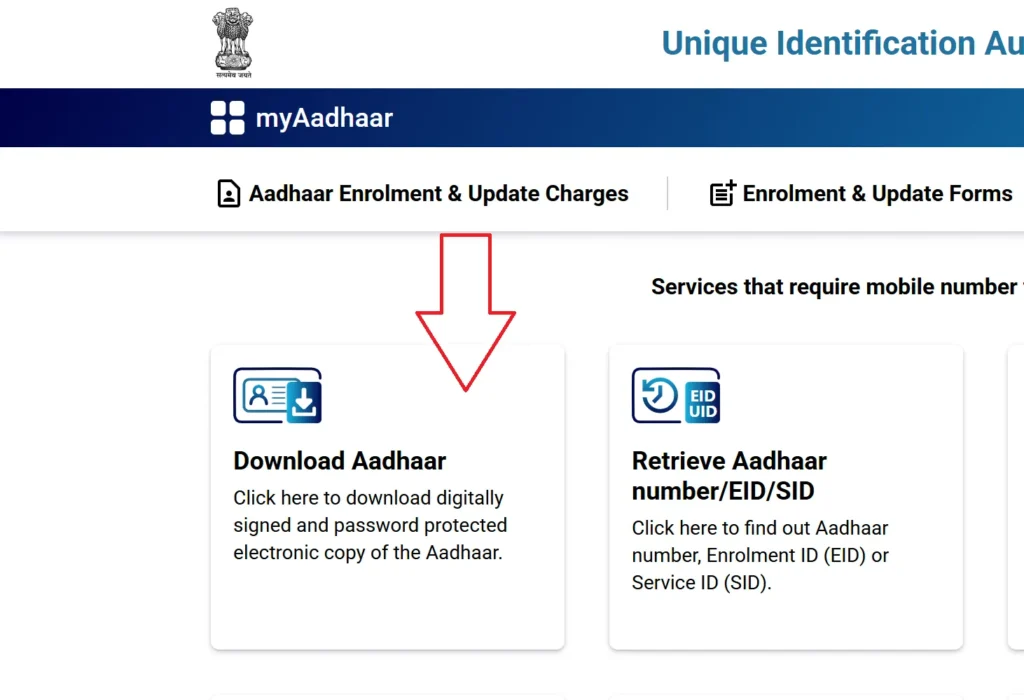
- Choose an option:
- Aadhaar Number (UID)
- Enrolment ID (EID)
- Virtual ID (VID)
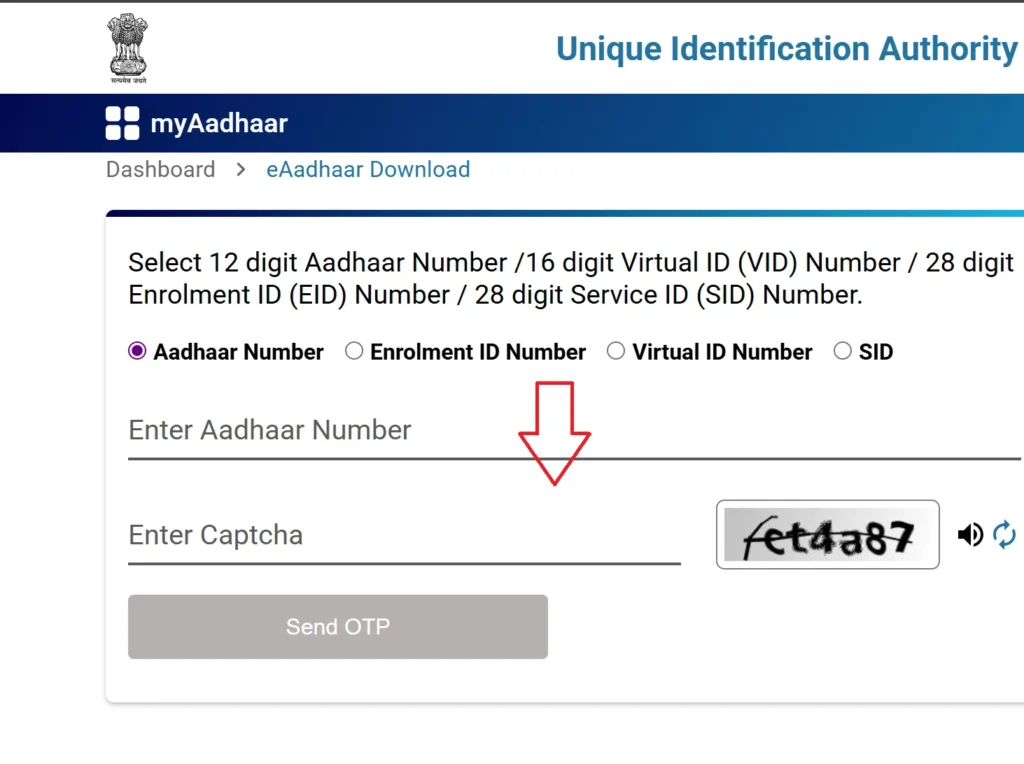
- Enter the captcha code.
- Click “Send OTP” to receive a one-time password on your registered mobile number.
- Choose Regular or Masked Aadhaar.
- Enter OTP → click “Verify and Download”.
- Open the PDF with the password format described earlier.
Newly updated Aadhaar details will reflect instantly in your downloaded e-Aadhaar.
2. UIDAI Aadhaar Card Download Via mAadhaar Mobile App
- Download mAadhaar App from Google Play Store or App Store.
- Select language → enter your registered mobile number.
- Verify OTP.
- From the dashboard, select “Download Aadhaar”.
- Enter Aadhaar Number/EID/VID and captcha.
- Generate OTP/TOTP → click “Verify & Download.”
- Open the PDF with your password.
The mAadhaar app also lets you lock/unlock biometrics, verify Aadhaar, and order PVC cards.
3. Aadhaar Card Download Via DigiLocker
- Visit digilocker.gov.in or use the DigiLocker mobile app.
- Sign in using mobile number, username, or Aadhaar.
- Search “UIDAI” → select Aadhaar.
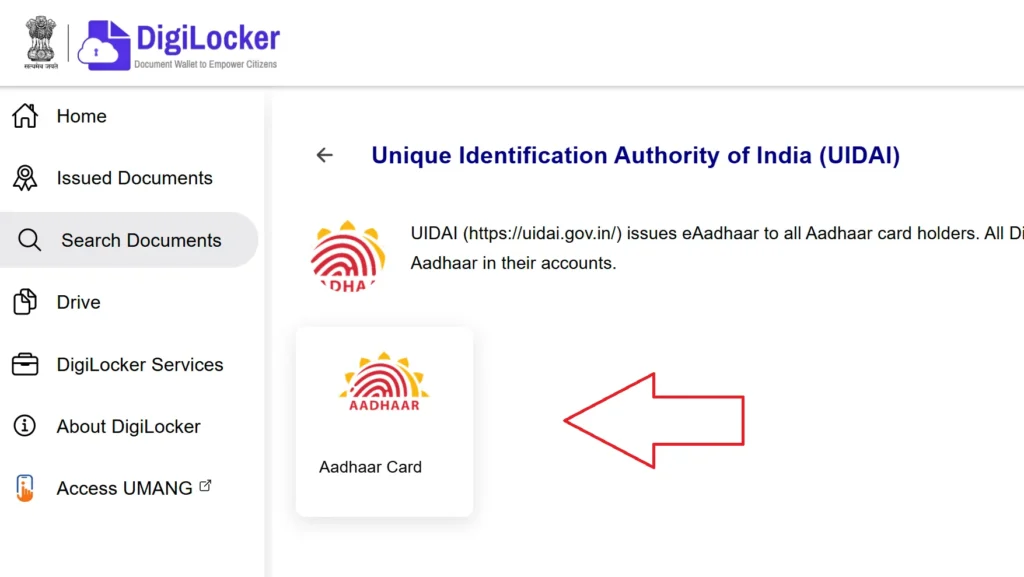
- Enter your Aadhaar number → verify with OTP.
- Download your Aadhaar from the “Issued Documents” section.

4. Aadhaar Card Download Using Name and Date of Birth
If you forgot your Aadhaar number or EID:
- Visit UIDAI Portal → click “Retrieve EID/Aadhaar Number.”
- Enter your name, registered mobile/email, and date of birth.
- Complete captcha → click “Send OTP.”
- Retrieve your Aadhaar or EID via SMS/email.
- Use this number to download e-Aadhaar from the main portal.
5. Without Registered Mobile Number
If your mobile number isn’t linked:
- Visit your nearest Aadhaar Seva Kendra (ASK).
- Verify your identity via biometrics.
- Provide an ID proof (e.g., PAN card, Voter ID).
- Request a printed Aadhaar copy (₹30 for colour print, ₹50 for PVC).
Printing Your e-Aadhaar
- Open the downloaded PDF in a reader.
- Enter your password (first 4 letters of name + birth year).
- Click Print.
Example passwords:
| Name | Birth Year | Password |
| Sameer Sarkar | 1990 | SAME1990 |
| Raj Yadav | 1988 | RAJY1988 |
| Ria Sharma | 1990 | RIAS1990 |
| R.M. Kumar | 1989 | R.M.1989 |
| Sai | 1989 | SAI1989 |
Masked Aadhaar Card Download
A Masked Aadhaar hides the first eight digits of your Aadhaar number (e.g., XXXX XXXX 1234), offering enhanced privacy while remaining legally valid for KYC and identity verification.
Key Features
- Shows only last four digits of Aadhaar
- Includes name, address, DOB, photo, and QR code
- Accepted for all government and private verifications
- Free to download from UIDAI
Steps to Download Masked Aadhaar
- Visit myaadhaar.uidai.gov.in
- Click “Download Aadhaar.”
- Enter Aadhaar/VID + captcha.
- Select “Do you want a masked Aadhaar?” → Yes
- Click “Send OTP” → verify.
- Download the password-protected PDF (using the same password format).
| For Support: Call the UIDAI toll-free number 1947 or visit the nearest Aadhaar Seva Kendra. Supported languages: English, Hindi, Tamil, Telugu, Kannada, and more. |
FAQs: Aadhaar Card Download
How can I download my Aadhaar card online in 2025?
You can download your Aadhaar card (e-Aadhaar) from the official UIDAI portal — myaadhaar.uidai.gov.in — using your Aadhaar number (UID), Enrolment ID (EID), or Virtual ID (VID). Enter the details, verify with OTP, and download the password-protected PDF.
What is the password to open my Aadhaar PDF file?
The e-Aadhaar PDF file is password-protected. The password is a combination of the first four letters of your name (in uppercase) followed by your year of birth.
Example: For Riya Sharma born in 1992 → RIYA1992
Can I download my Aadhaar card without a registered mobile number?
No, you cannot download it online without a registered mobile number. If your mobile number isn’t linked to your Aadhaar, you must visit the nearest Aadhaar Seva Kendra (ASK) or enrolment center to update your mobile number and get a print copy.
What is a Masked Aadhaar?
A Masked Aadhaar displays only the last four digits of your Aadhaar number (e.g., XXXX XXXX 1234). It helps protect your privacy while remaining valid for all identity and KYC purposes.
Is e-Aadhaar valid like the physical Aadhaar card?
Yes. As per the Aadhaar Act, 2016, the e-Aadhaar (digital copy) is equally valid as the physical Aadhaar card for identity and address proof across India.