The Unique Identification Authority of India (UIDAI) was established in 2009 by the Government of India under the Ministry of Electronics and Information Technology (MeitY). It serves as the central authority for implementing the Aadhaar project, designed to provide a unique 12-digit identity number to every resident of India. Through the My Aadhaar UIDAI platform, citizens can conveniently access essential services such as Aadhaar updates, verification, and downloads, ensuring a seamless and secure digital identity experience.
UIDAI My Aadhaar Login
The Aadhaar login process on the MyAadhaar portal enables secure access to a range of Aadhaar-related services by using your 12-digit Aadhaar number and a one-time password (OTP). This login is crucial for updating demographic details and utilizing the various value-added services provided by UIDAI.
Login Process (MyAadhaar Portal):
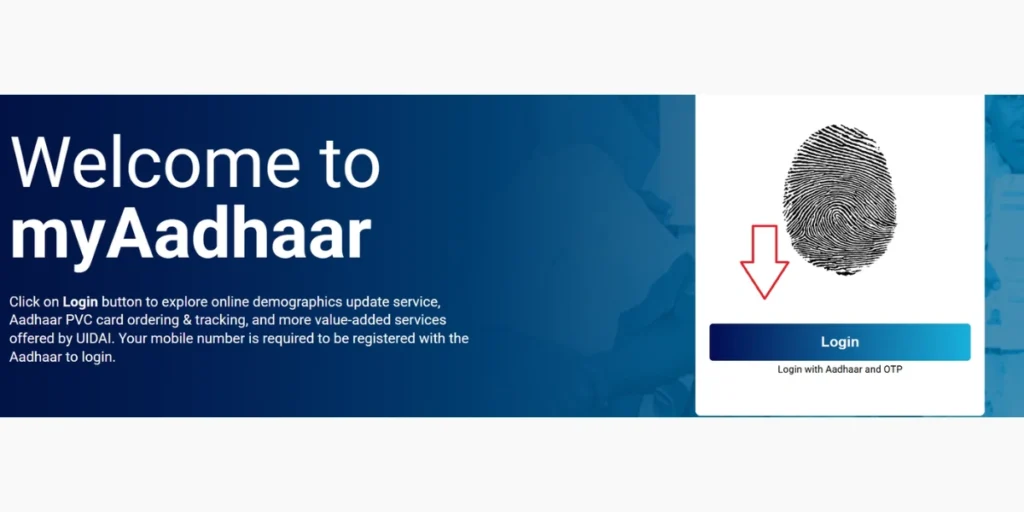
- Visit the MyAadhaar portal (myaadhaar.uidai.gov.in).
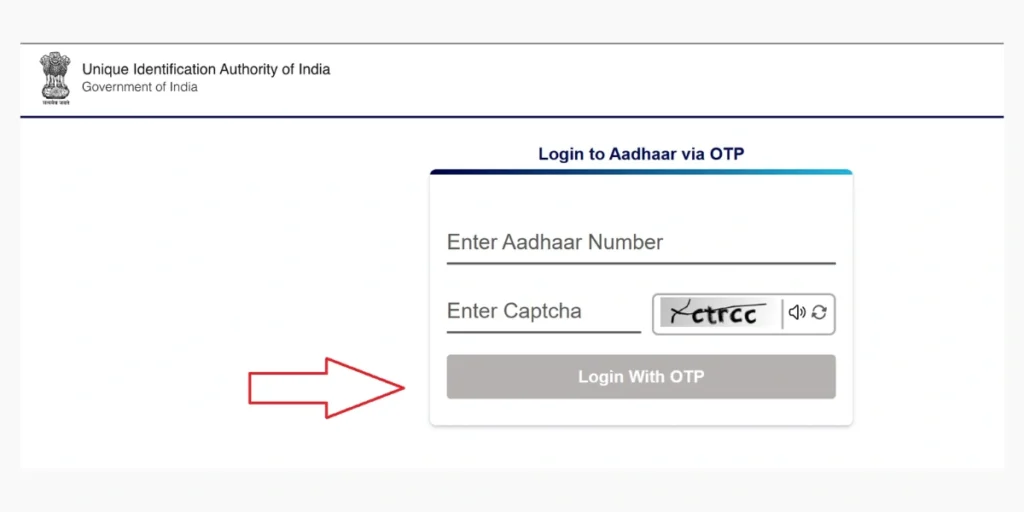
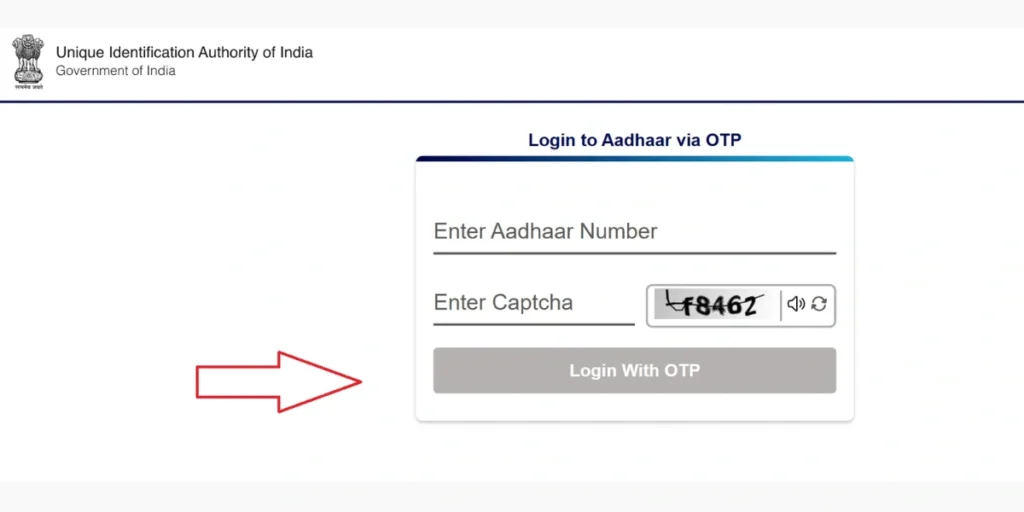
- Click the Login button and enter your 12-digit Aadhaar number along with the captcha code.
- Select “Login with OTP”; an OTP will be sent to your registered mobile number.
- Enter the OTP to successfully access your Aadhaar dashboard.
Aadhaar Services Offered by the UIDAI Portal
UIDAI provides a wide range of services that simplify the process of enrolling, updating, retrieving, and managing Aadhaar. Below is a detailed, step-by-step guide to these essential services:
Download Aadhaar (e-Aadhaar)
Download a secure digital version of your Aadhaar that can be used across multiple services.
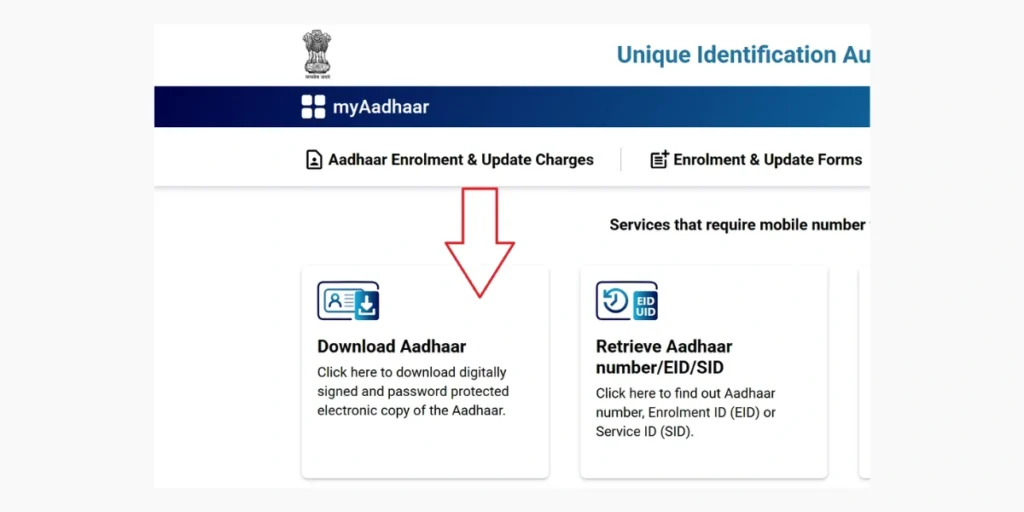
- Open the Aadhaar Download Page: Go to https://myaadhaar.uidai.gov.in/ and select the ‘Download Aadhaar’ option.
- Enter Your Details: Fill in your Aadhaar Number, Enrolment ID (EID), or Virtual ID (VID), and then complete the captcha shown on the screen.
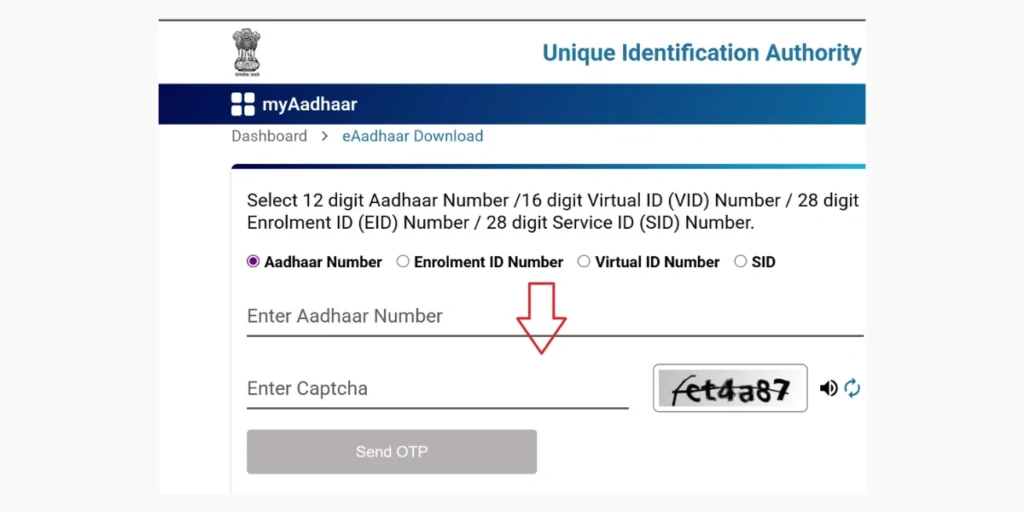
- Authenticate Using OTP: You will receive a one-time password (OTP) on your registered mobile number. Enter the OTP to continue.
- Download the PDF: After successful verification, you can Download Aadhaar PDF file. The file is password-protected; use the first four capital letters of your name along with your birth year to open it.
| Example: If your name is “Shivansh” and your birth year is 2005, your password will be Shiv2005. |
Check Enrolment or Update Status
Check the current status of your Aadhaar enrolment or update request.
- Go to https://myaadhaar.uidai.gov.in and select the Check Enrolment & Update Status option.
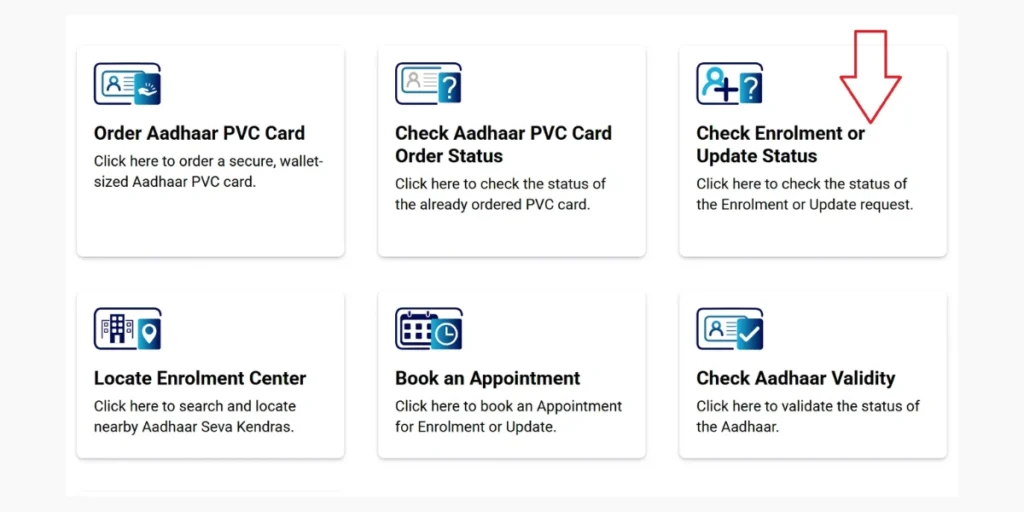
- Enter URN or EID: Enter your Update Request Number (URN) or Enrolment ID (EID) and complete the OTP authentication.
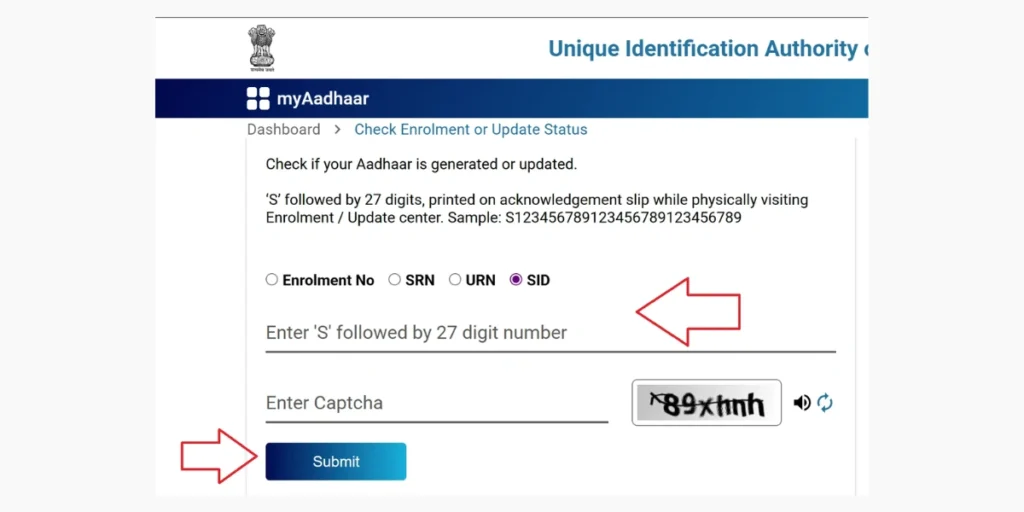
- The UIDAI portal will show the current status of your request.
| Note: You can also check your Aadhaar enrolment or update status by calling the toll-free number 1947 from your registered mobile number. Choose your preferred language (e.g., press 1 for Hindi, 2 for English), then press 1 for enrolment status or 2 for update status. When prompted, enter your 28-digit Enrolment ID (EID) or Update Request Number (URN). Follow the IVR instructions to hear the status—such as “Aadhaar Generated” or “Under Processing.” Make sure your mobile number is registered with UIDAI. |
Document Update
If any of your Aadhaar details- such as name, address, date of birth, or gender- need to be updated or corrected, you can make the changes online.
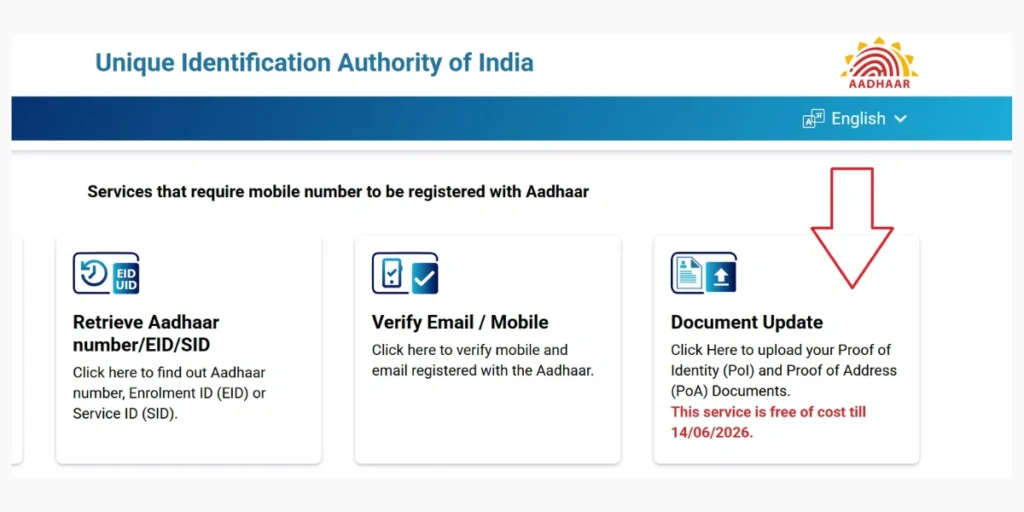
- Go to the UIDAI portal at myaadhaar.uidai.gov.in and select the Document Update option.
- Log In: Enter your Aadhaar Number and verify it using the OTP sent to your registered mobile number.
- Select “Update Aadhaar”: Choose the details you wish to modify, such as your address, name, date of birth, or gender. Make sure you have the required supporting documents ready, like Proof of Identity (PoI) or Proof of Address (PoA).
- Upload Documents: Upload clear, scanned copies of the required documents, ensuring they meet UIDAI’s validity and quality guidelines.
- Review and Submit: Check all the details you’ve entered thoroughly. Submit your update request and save the Update Request Number (URN) for future tracking.
- Track Status: Use your URN on the portal to monitor the progress of your update request.
| Important Note: This service is available free of charge until 14/06/2026. |
Note: To update the mobile number linked to your Aadhaar, visit any Aadhaar Enrolment Centre. Share your Aadhaar number and the new mobile number, then complete the biometric verification (fingerprint or iris scan). No documents or old mobile numbers are required. The service is free, and you’ll receive a confirmation once the update is completed.
Retrieve EID or Aadhaar Number
- Go to https://myaadhaar.uidai.gov.in/ and click on the Retrieve EID / Aadhaar Number option.
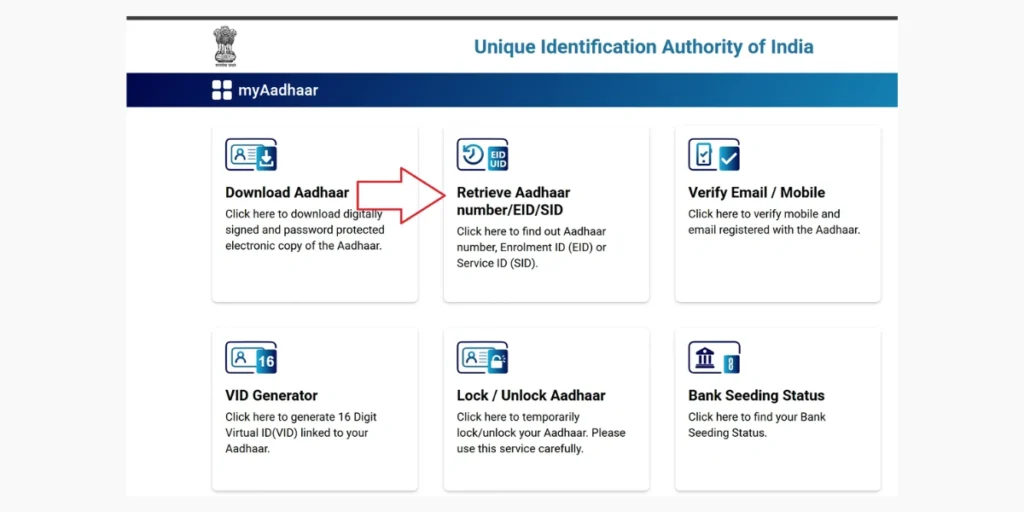
- Enter Your Information: Provide your full name along with your registered mobile number or email ID. Then choose whether you want to retrieve your Aadhaar Number or Enrolment ID.
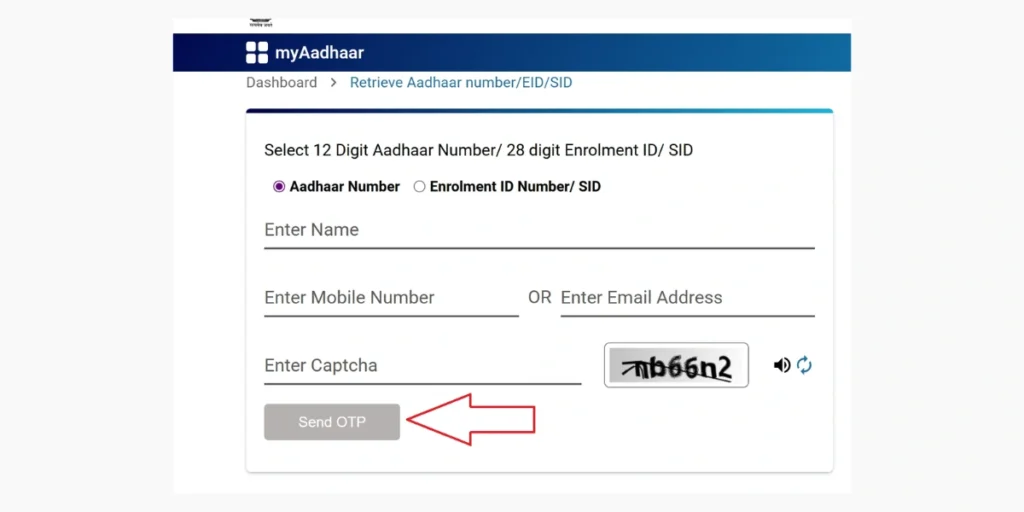
- Verify Details: Enter the captcha, request an OTP, and then input the OTP sent to your mobile number or email.
- Retrieve Your Number: Your Aadhaar Number or Enrolment ID (EID) will be sent to your registered mobile number or email.
Verify Email/Mobile Number
Ensure that your registered email and mobile number are linked to Aadhaar for hassle-free services.
- Go to myaadhaar.uidai.gov.in and select the Verify Email / Mobile option.
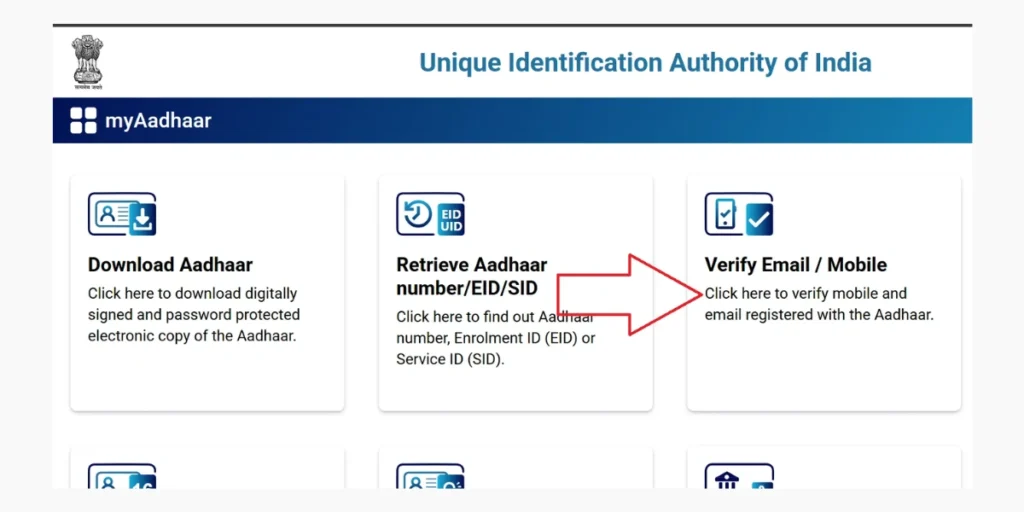
- Enter Aadhaar Details: Enter your Aadhaar Number along with your registered mobile number or email ID, then fill in the captcha code.
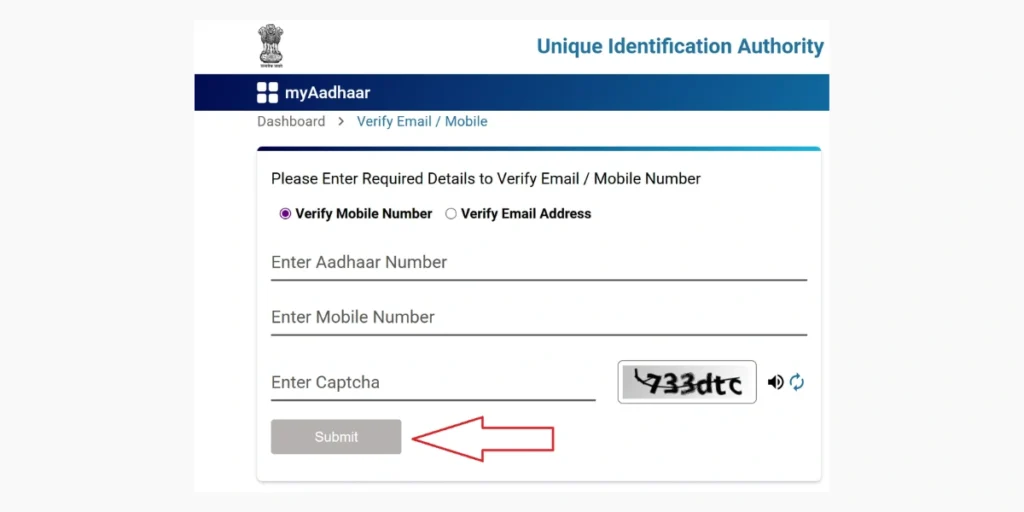
- Authenticate: You’ll receive an OTP on your registered mobile number or email. Enter the OTP to finish the verification process.
- Confirmation: If the information matches, a confirmation message will appear on the screen.
Generate Virtual ID (VID)
A Virtual ID (VID) is a temporary, revocable 16-digit number that can be used instead of your Aadhaar Number to enhance privacy.
- Go to myaadhaar.uidai.gov.in and select the VID Generator option.
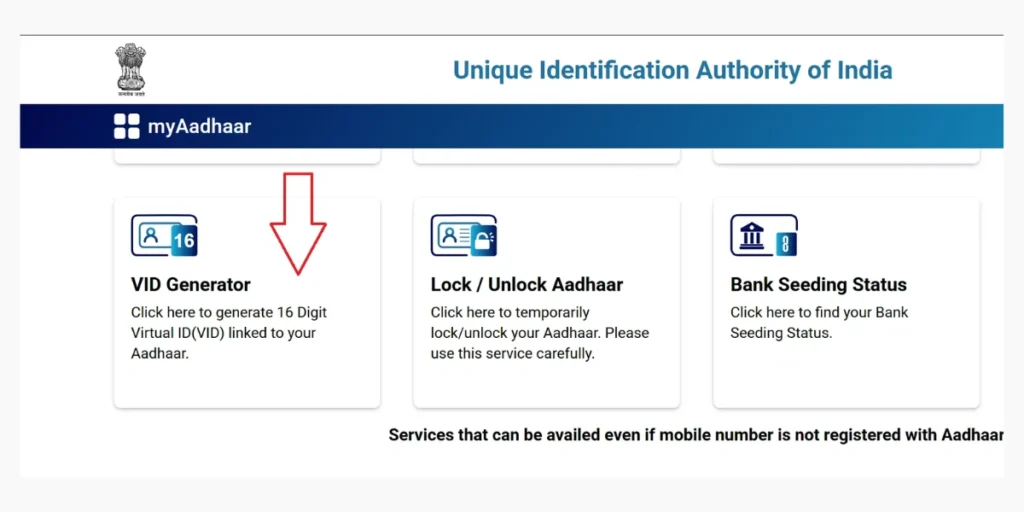
- Enter your Aadhaar Number and verify it using the OTP. Then select either Generate New VID or Retrieve Existing VID.
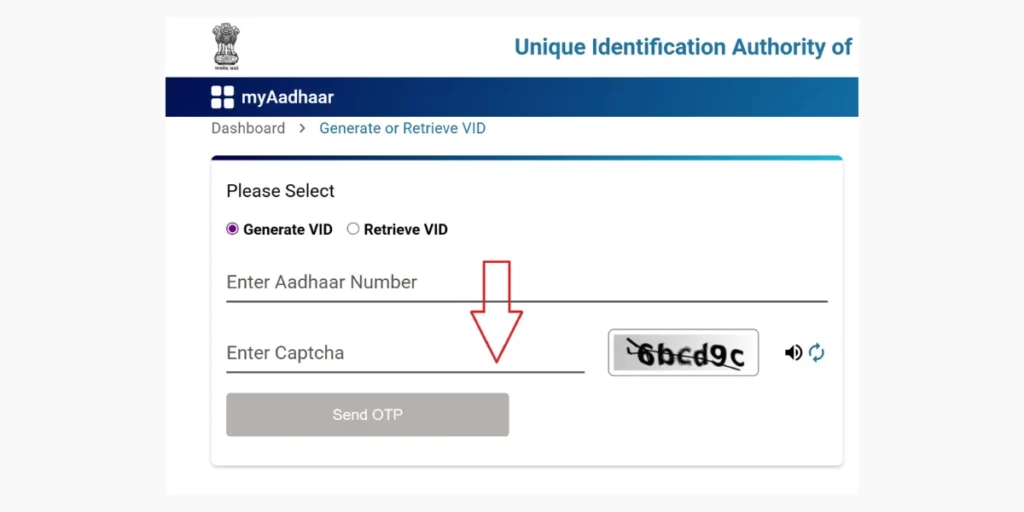
- Your VID will appear on the screen and will also be sent to your registered mobile number.
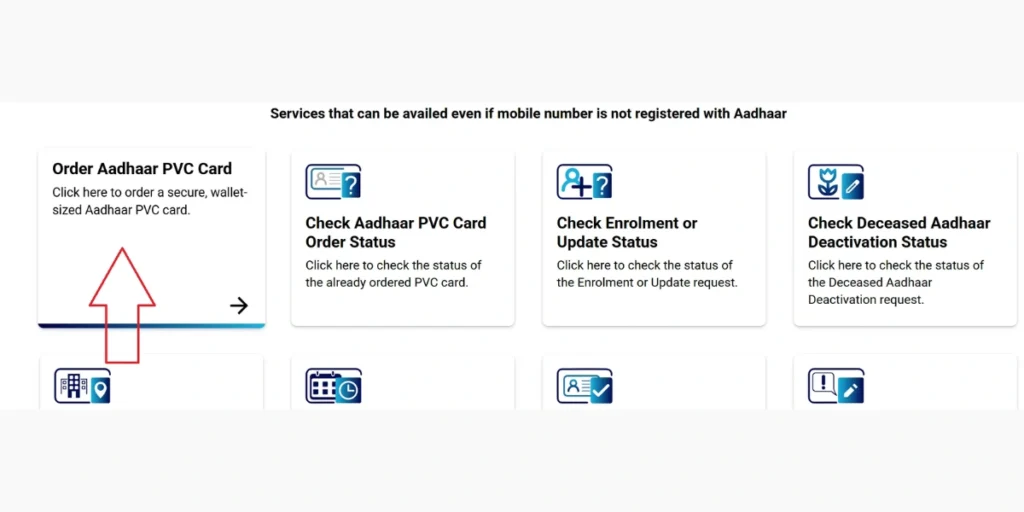
Order Aadhaar PVC Card
The Aadhaar PVC card is a sturdy, wallet-friendly version of your Aadhaar card.
- Go to https://myaadhaar.uidai.gov.in and select the Order Aadhaar PVC Card option.
- Enter Your Aadhaar Number: Provide your Aadhaar Number and complete the captcha for verification.
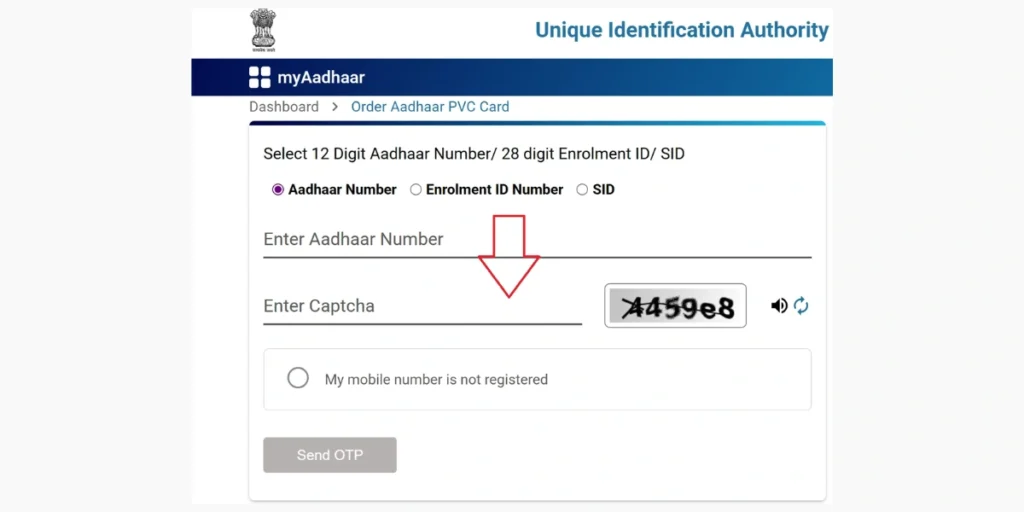
- Pay Online: Make the nominal payment of ₹50 (inclusive of GST and Speed Post charges) and confirm your request.
- Your Aadhaar PVC card will be sent to your registered address.
To track the status of your Aadhaar PVC Card request:
- Go to myaadhaar.uidai.gov.in, navigate to the My Aadhaar section, and click on Check Aadhaar PVC Card Status.
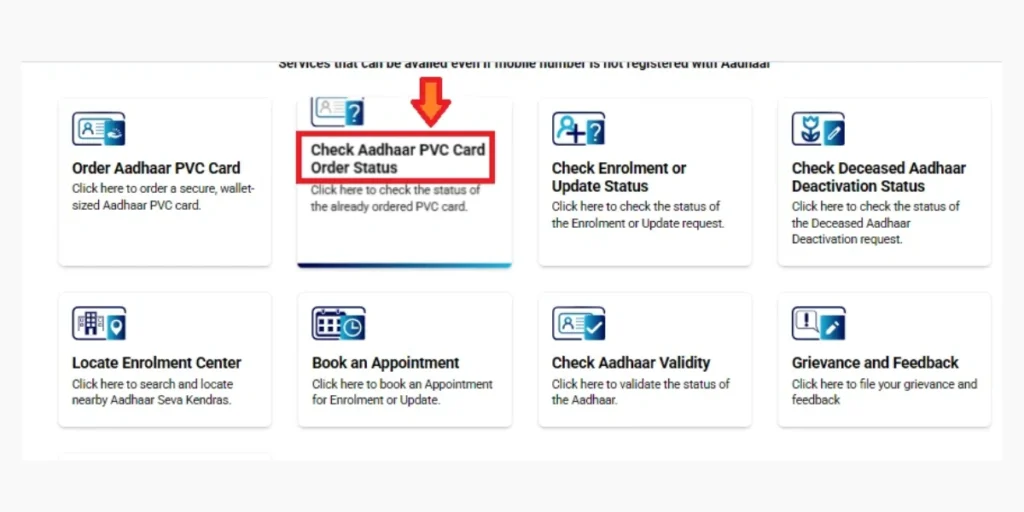
- Provide: Enter the 28-digit Service Request Number (SRN) from your payment receipt and the captcha code.
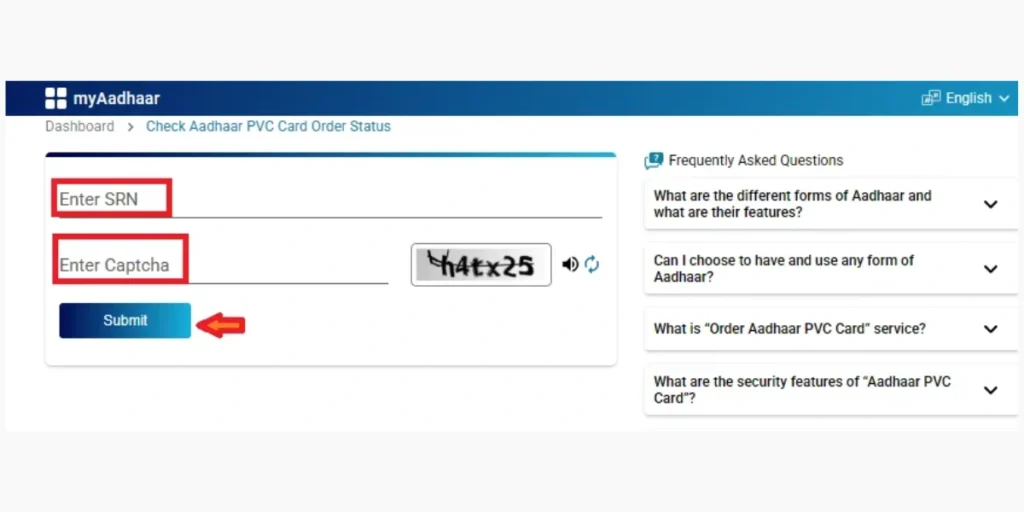
- Click Submit to see the current status, such as “Order Processed,” “Handed Over to DoP,” or “Delivered.”
Once an order is placed, UIDAI forwards the PVC Aadhaar Card to the Department of Posts (DoP) within 5 working days (excluding the request day). Delivery typically takes 5–15 working days via Speed Post and is sent to the address registered in your Aadhaar.
Locate Enrolment Center
Locate Aadhaar Seva Kendras near you for enrolment or updating your Aadhaar details.
- Go to myaadhaar.uidai.gov.in and select the Locate Enrolment Center option.
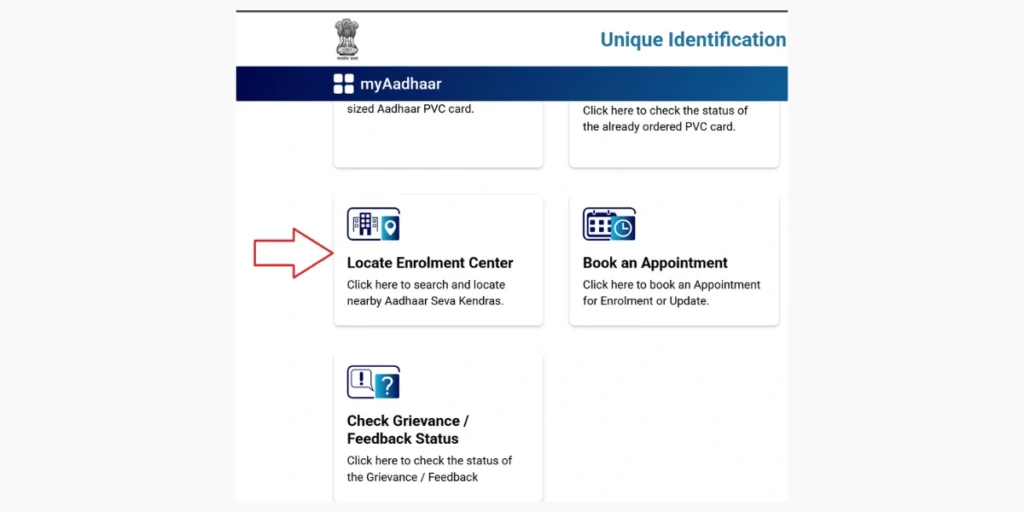
- Search: Enter your PIN code, city, or state to see a list of nearby centres along with their addresses and contact information.
Note: You can visit an Aadhaar Enrolment Center to enrol for a new Aadhaar or update existing details. For new enrolment, provide your personal information, biometrics, and documents to receive an Enrolment ID (EID). For updates, submit the required documents, complete biometric verification, and obtain an Update Request Number (URN).
Aadhaar and UIDAI: Overview and Latest Updates
The Aadhaar program, managed by the Unique Identification Authority of India (UIDAI), is a flagship initiative that issues a 12-digit unique identification number to residents of India.
It acts as a valid proof of identity and address, enabling access to government subsidies, banking services, telecom connections, and various other facilities.
Aadhaar
Aadhaar is a 12-digit unique identification number issued to residents of India. It combines demographic information- such as name, address, date of birth, gender, mobile number, and email- with biometric data, including fingerprints, iris scans, and a facial photograph, to create a secure and deduplicated identity.
Enrollment in Aadhaar is voluntary and free. It is available to all residents, including Indian citizens, Non-Resident Indians (NRIs), and foreign nationals who have lived in India for at least 182 days in the past 12 months.
Core Features
- Unique Identity: Biometric deduplication ensures that each Aadhaar number is unique, preventing duplicates.
- e-Aadhaar: A password-protected digital PDF that is legally valid under the Aadhaar Act 2016. The password is the first four letters of your name in uppercase, followed by your birth year (e.g., PRIY1997).
- Masked Aadhaar: Shows only the last four digits of the Aadhaar number (e.g., XXXX XXXX 1234) to protect privacy when sharing.
- Baal Aadhaar: A blue-colored Aadhaar card for children under 5, linked to a parent’s Aadhaar and containing only a photograph (no biometric data).
- Aadhaar PVC Card: A durable plastic card that can be ordered for ₹50 via myAadhaar and is delivered within 5 working days.
- Virtual ID (VID): A 16-digit temporary number for authentication, revocable via myAadhaar, providing enhanced privacy.
- Not Proof of Citizenship: Aadhaar confirms identity and address, not nationality, as clarified by UIDAI and Supreme Court rulings.
Applications
- Financial Inclusion: Streamlines KYC processes for bank accounts, mutual funds, and insurance services.
- Direct Benefit Transfer (DBT): Facilitates the direct delivery of government subsidies, such as LPG, PM-KISAN, and Ayushman Bharat.
- Digital Services: Supports Aadhaar-enabled Payment System (AePS), UPI transactions, and various e-Governance platforms.
- Other Uses: Used for telecom SIM activation, passport applications, and educational verifications.
UIDAI
The Unique Identification Authority of India (UIDAI) is a statutory organization established under the Aadhaar (Targeted Delivery of Financial and Other Subsidies, Benefits and Services) Act, 2016, which was enacted on 12 July 2009. Functioning under the Ministry of Electronics and Information Technology (MeitY), UIDAI is responsible for the implementation and management of the Aadhaar program.
Mandate
- Issue unique Aadhaar numbers to residents of India.
- Maintain the Central Identities Data Repository (CIDR), a secure database of Aadhaar information.
- Offer authentication services for identity verification.
- Ensure privacy, security, and adherence to legal frameworks.
- Promote social and financial inclusion by facilitating access to services for marginalized groups.
Organizational Structure
- Headquarters: Located in New Delhi, with regional offices in Bengaluru, Mumbai, Hyderabad, and other major cities.
- Leadership: Chaired by Neelkanth Mishra and led by CEO Bhuvnesh Kumar, both appointed by the Government of India.
- Operations: Oversees Aadhaar Seva Kendras (ASKs), Permanent Enrolment Centres (PECs) at banks and post offices, and digital platforms such as the myAadhaar portal and mAadhaar app.
- Helpline and Support: Toll-free number 1947, available in multiple languages. Email support: help@uidai.gov.in.
FAQ
What is the My Aadhaar UIDAI portal?
The My Aadhaar UIDAI portal is an official online platform provided by the Unique Identification Authority of India (UIDAI). It allows residents to enrol, update Aadhaar details, download e-Aadhaar, order PVC cards, verify mobile/email, and access various Aadhaar-related services.
What services can I access on the UIDAI portal?
The UIDAI portal offers a wide range of services including Aadhaar enrolment updates, e-Aadhaar download, address updates, mobile/email verification, Virtual ID generation, PVC Aadhaar card ordering, and Aadhaar authentication history checks.
Do I need to create a separate account to use the My Aadhaar portal?
No, you do not need a separate account. You can log in using your Aadhaar Number and authenticate using the OTP sent to your registered mobile number. Once logged in, you can access all personalized Aadhaar services.
Is it safe to use the UIDAI portal for Aadhaar updates and downloads?
Yes, the UIDAI portal uses advanced encryption, OTP-based authentication, and secure data handling practices to protect your information. Always ensure you access the official website (myaadhaar.uidai.gov.in) for all Aadhaar-related services.